In today’s fast-paced, hybrid work environment, collaboration depends on more than just great ideas; it depends on great tools. Whether your team is gathered in a conference room, spread across multiple offices, or working from home, interactive whiteboards have become the go-to solution for visual communication, brainstorming, and teamwork.
But not all interactive whiteboards are created equal. The best models—like Ricoh’s D6520 and D8600—combine intuitive design with smart software integrations that make meetings more efficient, productive, and engaging.
Let’s explore the top interactive whiteboard features that help teams collaborate more effectively in 2026 and how businesses across Long Island, NYC, and the greater New York area are using them to stay connected and creative.
1. Real-Time Multi-User Collaboration
The ability for multiple users to interact with the display at once is one of the most powerful features of a modern interactive whiteboard.
Whether you’re brainstorming new product ideas or mapping out a marketing campaign, multi-touch functionality allows several team members to draw, write, or move objects on the screen simultaneously, just like using a physical whiteboard.
This feature is especially valuable in:
- Team strategy sessions, where ideas can be sketched, moved, and organized together.
- Design reviews, where multiple team members annotate or mark up visuals.
- Problem-solving meetings, where real-time collaboration keeps everyone engaged.
No more waiting for one person to “pass the marker”; everyone can contribute at once.
2. Seamless Wireless Connectivity
Gone are the days of fumbling with cables and adapters. The best interactive whiteboards offer wireless screen sharing that works across all devices—laptops, tablets, and smartphones, regardless of platform.
With Wi-Fi Direct, Miracast, and AirPlay support, presenters can easily connect and share content without interrupting the meeting flow.
This feature ensures that:
- Remote participants can view and interact in real time.
- On-site users can share content instantly from their own devices.
- Presentations run smoothly without switching inputs or reconfiguring hardware.
In hybrid meetings, this kind of frictionless sharing keeps everyone on the same page (literally).
3. Integrated Video Conferencing
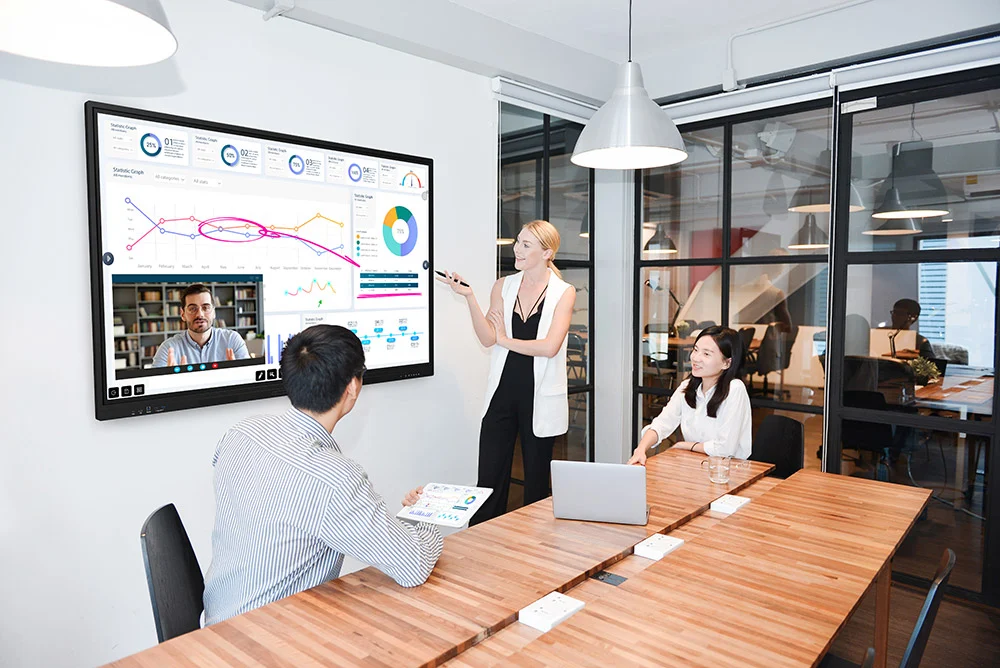
Today’s meetings are just as likely to include remote participants as in-person ones. That’s why integration with video conferencing platforms like Zoom, Microsoft Teams, and Google Meet is essential.
Modern interactive whiteboards act as an all-in-one collaboration hub, combining display, touch input, camera, and microphone in a single device.
This means you can:
- Start a video meeting directly from the whiteboard.
- Annotate shared screens during live discussions.
- Record and save meeting notes digitally.
When used with high-quality built-in microphones and cameras, the whiteboard becomes a powerful conference room centerpiece, capable of supporting hybrid collaboration without extra equipment.
4. Digital Annotation and Note Capture
A hallmark of great collaboration is the ability to visualize ideas and digital annotation tools make that easier than ever.
With a responsive touchscreen and stylus input, interactive whiteboards let you:
- Draw, highlight, and underline key points.
- Annotate over documents, spreadsheets, or presentations.
- Capture and save your notes instantly.
Once the meeting ends, annotations can be emailed, exported to PDF, or saved directly to cloud storage, ensuring no idea is lost.
Instead of taking pictures of whiteboards or transcribing handwritten notes, teams leave with an organized digital record, perfect for follow-up meetings and project tracking.
5. Cloud Integration and File Sharing
Collaboration doesn’t stop when the meeting ends. The best interactive whiteboards connect directly to cloud services like Google Drive, OneDrive, Box, and Dropbox, allowing teams to access and save files on the fly.
That means:
- You can open presentations or reports directly from your cloud folder.
- Annotated files can be saved instantly back to the same location.
- Everyone on the team has access to the latest version—no emailing attachments.
This feature is particularly useful for companies with distributed teams, where real-time file access keeps everyone synced and productive.
6. Cross-Platform Compatibility
Your collaboration tools should adapt to your workflow, not the other way around.
Top-tier interactive whiteboards work seamlessly with Windows, macOS, Android, and iOS devices. Users can connect through a web browser, app, or QR code, no special software required.
This flexibility allows everyone to participate, regardless of device or operating system. In mixed environments (for example, a PC-based office with Mac-using designers), cross-platform compatibility keeps teamwork effortless.
7. Built-In Whiteboard and Brainstorming Apps
Many interactive whiteboards now come with built-in digital whiteboarding tools designed for real-time brainstorming.
These apps offer features like:
- Infinite canvases for free-form ideation.
- Sticky notes and drawing tools.
- Shape recognition for neat diagrams.
- Smart text conversion for legible handwriting.
With these tools, brainstorming sessions stay creative and organized, and ideas can be saved, revisited, or exported directly to project management platforms like Trello, Asana, or Slack.
Ricoh’s built-in collaboration software, for instance, provides a clean, intuitive interface that mimics a physical whiteboard experience while adding powerful digital flexibility.
8. Split-Screen Functionality
In many meetings, teams need to reference multiple documents or presentations at once. Split-screen mode lets you display two or more windows side by side—such as a PowerPoint deck on one side and a spreadsheet or video call on the other.
This multitasking capability streamlines discussions and decision-making by allowing everyone to compare information without toggling between screens.
For hybrid meetings, split-screen can even show remote participants on one half and shared content on the other, keeping everyone visible and engaged.
9. Secure Access and Data Protection
With so much sensitive information shared in meetings—financial data, client plans, or internal strategies—security is critical.
Look for interactive whiteboards with:
- User authentication and password protection
- Encrypted file transfer
- Automatic data wipes after sessions
These features prevent unauthorized access and ensure your organization stays compliant with data privacy standards.
Ricoh’s business displays, for instance, include robust security controls that integrate with existing IT systems, giving administrators full control over access and permissions.
10. Easy Maintenance and Software Updates
IT teams appreciate that today’s interactive whiteboards are designed for long-term reliability. Cloud-based firmware updates and remote management tools make it easy to keep systems running smoothly with minimal disruption.
Features like:
- Remote diagnostics,
- Automatic software updates, and
- Proactive support alerts
help reduce downtime and extend the device’s lifespan, keeping collaboration consistent and reliable.
When you purchase from a local dealer like us, you also get on-site service and support, ensuring your whiteboards stay optimized year-round.
11. Environmental and Energy Efficiency Features
Modern organizations are prioritizing sustainability, and interactive whiteboards support those goals through energy-efficient LED displays and low-power standby modes.
By replacing projectors (which often require bulb changes and higher power usage), interactive whiteboards can significantly reduce your office’s carbon footprint while improving visual clarity and durability.
This aligns with many companies’ ESG initiatives, demonstrating a commitment to both innovation and sustainability.
12. The ROI of Smarter Collaboration
Beyond features, the true value of an interactive whiteboard lies in the productivity gains it delivers.
Teams using these tools report:
- Faster meeting setup and decision-making
- Better engagement from remote participants
- Reduced travel and printing costs
- Improved documentation and accountability
In other words, the investment pays for itself through more efficient collaboration, clearer communication, and better use of everyone’s time.
Interactive whiteboards have evolved into essential tools for the modern workplace—empowering teams to collaborate, share ideas, and communicate more effectively, whether they’re in the same room or across the world.
From multi-user interaction and cloud integration to built-in conferencing and secure file sharing, these displays streamline how organizations plan, create, and execute projects.
At Emerald Document Imaging, we help businesses across Long Island, NYC, and the tri-state area implement the latest Ricoh Interactive Whiteboards, with professional installation, training, and ongoing local support to ensure you get the most out of your investment.
Bring your team together, simplify your meetings, and transform how your organization collaborates.